Contents
- Index
Preferences
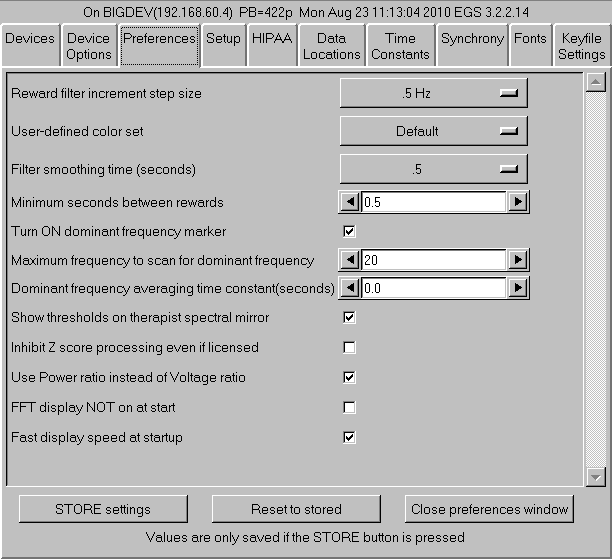
- The "Reward filter increment step size" of the reward filter center frequency shift can be selected (here it is .5 Hz but .125 Hz (50 Hz set only) and .25 Hz are also available).
- The "User-defined color set" option allows specification of a custom color set (set using the color changer tool under Tools).
- "Filter smoothing time (seconds)" controls the smoothing time constant for filters. The default value is 0.5 seconds. The range is .1 to .9 seconds. This value is also controllable in game tailoring.
- "Minimum seconds between rewards" determines the rate at which rewards can be sent to whatever game is currently running. The default value is 0.5 seconds. The minimum value is 0.25 seconds. The maximum value is 30 seconds. This value is also controllable in game tailoring.
- "Turn ON dominant frequency marker" turns on the dominant frequency marker at the beginning of the realtime sessions. It can still always be toggled by using Alt-F10.
- "Maximum frequency to scan for dominant frequency" allows selection of a range of values to scan for a dominant (highest amplitude) frequency. Set to 0 means using the default of 15 Hz.
- "Dominant frequency averaging time constant(seconds)" allows selection of an averaging time for dominance determination.
- "Show thresholds on therapist spectral mirror" allows preselection of additional data on the therapist spectral mirror display. This can also be toggled on/off using the Therapist display options popup menu.
- "Inhibit Z score processing even if licensed" turns off zscore computation if performance issues exist.
- "Use Power ratio instead of Voltage ratio" selects which form of ratio reward to use.
- "FFT display NOT on at start" turns off the FFT display on the brainwave screen. It can be turned on/off using the Ctrl-F10 option.
- "Fast display speed at startup" sets the sweep rate of the brainwave screen to fast mode. The rate can be toggled using the Alt-F12 option during run.