Contents
- Index
Appendix 25: Coherence
These instructions provide directions to activate and configure Coherence training modes.
For Coherence training, the following items must be valid:
• A valid EEGer license for Coherence training must be installed.
• All modes use both Channel A and B: 2 signal, 2 reference and either 1 shared ground or 2 ground electrodes (dependent upon amplifier model). ProComp/Infiniti amplifiers: An additional part, the FlexPro pre-amplifier, is necessary to utilize Channel B.
A. Install the EEGer Keyblock File:
- Insert the EEGer Keyblock File CD in your CD/DVD drive.
- If the contents of the CD are displayed automatically, close the window. You must load the key using EEGer.
- Start the EEGer program. From the Files menu, select Read EEGer Keyblock Files.
- Select the CD/DVD drive for the Look In field.
- The updated keyfile is displayed on the Open dialog. Click the filename to select/highlight and click Open.
B. Select the Coherence training mode in Plan Session
- Select Client for Coherence training.
- Click Choose Layout to choose the number of traces for the EEG display, except 8-trace Layout (Dual mode training layout).
- Click Plan Session.
- In the Setup stage, enter the sites for Input Chan A and Input Chan B.
- Click Feedback Mode at the top of the middle column to display a menu of options. Click the appropriate button to select the Coherence mode:
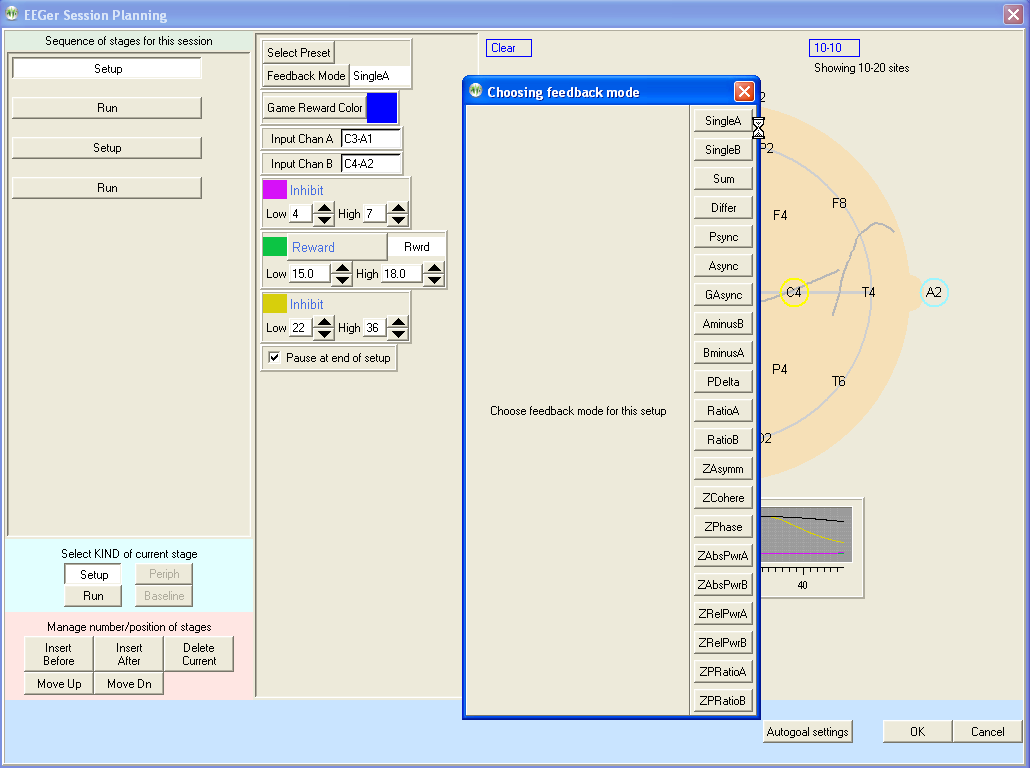
- Psync Comparison between filtered A and B envelopes (formerly Synchrony)
- Async Comparison between filtered A and B envelope slopes (formerly Comodulation)
- GAsync Comparison between lowpass A and B envelope slopes (formerly Global Comodulation)
- AminusB Difference between filtered A and B envelopes
- BminusA Difference between filtered B and A envelopes
- PDelta Comparison of phase difference between A and B signals
- DiffSum ratio of (A-B) to (A+B)
- Unity 1- (ratio of absolute value(A-B) to (A+B))
- Enter other relevant details for Setup and Run stages and click OK when finished.
C. Begin Session
- Apply sensors to the appropriate sites and connect to ChA and ChB of the amplifier.
- Set scales and thresholds and press F5 to run the session.
- To change the Coherence training mode during training, press Shift+F3 for a menu of choices.
It is suggested that you make changes to the session plan prior to the arrival of your client.
SET UP A COHERENCE TRAINING SESSION
Once EEGer is launched, select your client and go to the Plan Session screen.
Click Feedback Mode. You should get a long vertical list of choices.
Choose Psync. Make sure that Psync is what now displays in the box directly next to the Feedback Mode box.
Coherence training requires input from 2 channels so make sure that you set up both Channel A and Channel B on your amplifier. While on the Plan Session screen enter the site in the Input Chan A box (for example C4-A2) and the site in the Input Chan B box (for example C3-A1). These sites should be derived from a qEEG report.
Using the bandwidth information provided in the qEEG report; enter the numeric values for the frequencies that need coherence training in the REWARD band (for example "increase coherence in the 8-11 Hz range").
Click the button labeled Reward to select the appropriate mode for the type of coherence training to be performed. If you wish to INCREASE coherence, choose Rwrd. If you wish to DECREASE coherence, select Down and the box next to the REWARD box changes to Down.
NOTE: Coherence training is performed using the REWARD frequency band(s). Any Inhibit bands in the selected layout can be set to values based on your training or according to information in the QEEG report. The inhibit frequencies may overlap the reward/coherence frequencies to any degree.
Set the RUN time for the length of time you wish to do coherence training.
RUN A COHERENCE TRAINING SESSION
1. Go to Begin Session and select a game.
2. At the bottom of the Therapist screen you should see the word Psync. This confirms that you set up the training mode correctly and are properly licensed to run coherence training.
- Press the Page Down key until you highlight the Reward band.
- Once the Reward band is highlighted press F9; the Scale number in the Reward band should now be highlighted.
- Use the - or + keys to change the scale to 2. Press Enter twice to de-select.
NOTES:
- While running a coherence session, the signal in the Reward band does not look like a typical EEG signal, it is a smoother line that goes UP when the two signals (Channel A and Channel B) are MORE coherent and DOWN when they are LESS coherent. The number next to the AVG under the Reward band now represents the numerical value of coherence, not amplitude. Perfect coherence shows as 10. (While increased coherence may be the goal, perfect coherence is not necessarily ideal for achieving optimal performance.)
- Typically you can set the % Above numbers in the Reward band (now functioning as the coherence band) at 70%-80% to provide adequate information about the level of coherence. Set the inhibit band % Above numbers based on previous sessions or in a way that gives enough information about the frequency you are choosing. (This is a clinical judgment issue.)